Solana开发入门:从Hello World开始
笔者注:最近工作需要,我开始接触 Solana 链上程序开发。这篇文章是我的学习笔记,希望能帮助我记住这些内容,同时也希望能和 Solana 开发者们交流。文章假设读者已经掌握了 Rust 的基础语法,所以不会涉及到 Rust 语法的详细解释。如果你对 Rust 的基础语法还不熟悉,我推荐你阅读《Rust 编程入门、实战与进阶》这本书来进行学习。

Solana 简介
Solana 是一个高性能的底层公链,强调在不牺牲去中心化和安全性的情况下提升可扩展性。Solana 主网于 2020 年第一季度上线,目前全球节点超过 800 个,每秒交易处理量(TPS)最高可达 6.5 万,出块时间大约为 400 毫秒。
Solana 采用 PoH(历史证明)作为共识算法,其核心是一个去中心化的时钟,旨在解决分布式网络中缺乏单一可信时间源的问题。PoH 通过消除在节点网络中广播时间戳的需求,提高了整个网络的效率。
链上程序
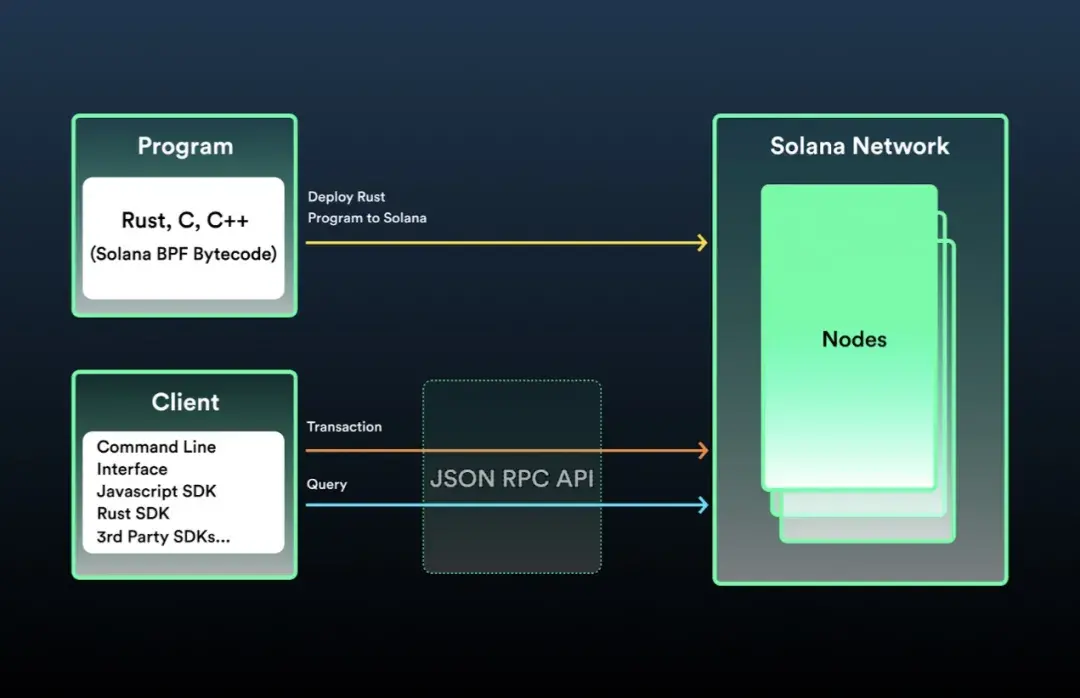
在 Solana 生态中,智能合约被称为链上程序(On-chain Program)。Solana 官方提供了 Rust 和 C 的 SDK 来支持开发这些程序。开发流程包括将程序编译成 Berkley Packet Filter (BPF) 字节码(文件扩展名为 .so),然后部署到 Solana 链上,通过 Sealevel 并行智能合约运行时来执行合约逻辑。基于 Solana JSON RPC API,官方还提供了多种 SDK 用于客户端与 Solana 链上数据的交互。
账户模型
Solana 的账户模型与以太坊相似,通过将任意状态存储在链上账户并同步给集群中的所有节点,可以创建复杂且强大的去中心化应用。Solana 的账户分为可执行账户和不可执行账户:可执行账户存储不可变的数据,主要用于存放程序的 BPF 字节码;不可执行账户存储可变的数据,用于存放程序的状态。
在 Solana 中,程序的代码和状态是分开存储的,程序的账户(可执行账户)只存储 BPF 字节码,而状态则存储在其他独立的账户(不可执行账户)中。每个账户都指定了一个程序作为其所有者,程序可以读取非自己所有的账户中的状态,但只有作为所有者的程序才能修改这些状态,否则修改将被还原,交易失败。
更多关于账户模型的详细信息,请参考 Solana 官方文档:https://solana.wiki/zh-cn/docs/account-model/
搭建编程环境
在开始 Solana 链上程序开发之前,需要安装和配置相关的编程环境。首先,确保安装了 Node、NPM 和 Rust 的最新稳定版本,然后安装 Solana CLI 并配置相关环境。
安装 Solana CLI
Solana CLI 是与 Solana 集群进行交互的命令行工具,包含 solana-validator、solana-keygen 以及 cargo-build-bpf、cargo-test-bpf 等合约开发工具。通过在终端运行以下命令,可以下载并安装 Solana CLI 的最新稳定版本:
sh -c "$(curl -sSfL https://release.solana.com/stable/install)"
安装成功后,你会看到类似以下内容的提示:
downloading stable installer✨ stable commit e9bef425 initializedAdding export PATH="~/.local/share/solana/install/active_release/bin:$PATH" to ~/.profileAdding export PATH="~/.local/share/solana/install/active_release/bin:$PATH" to ~/.bash_profileClose and reopen your terminal to apply the PATH changes or run the following in your existing shell: export PATH="~/.local/share/solana/install/active_release/bin:$PATH"
Solana CLI 的所有命令行工具都会安装在 ~/.local/share/solana/install/active_release/bin 目录,并自动将该路径添加到 ~/.profile 和 ~/.bash_profile 文件的 PATH 环境变量中。可以通过运行以下命令检查 PATH 环境变量是否已正确设置:
solana --version// solana-cli 1.7.18 (src:e9bef425; feat:1404640222)
如果显示了 solana-cli 的版本号和版本哈希等信息,说明环境变量设置成功。如果没有看到这些信息,请检查相关文件中 PATH 环境变量设置的路径是否正确。如果你已经安装过 Solana CLI 并想升级到最新版本,可以在终端运行以下命令:
solana-install update
配置 Solana CLI
连接到集群
Solana 提供了本地集群(localhost)和公开集群,公开集群又分为开发者网络(devnet)、测试网(testnet)和主网(mainnet-beta)。根据需要选择合适的集群,运行以下命令进行配置:
// 选择 devnet 集群solana config set --url devnet// 选择 localhost 集群solana config set --url localhost
创建账户
第一次使用 Solana CLI 时,需要创建一个账户。通过运行以下命令,并根据提示设置一个 BIP39 规范的密码(可选),生成新的账户后,密钥对会自动写入 ~/.config/solana/id.json 文件中。请注意,这种存储密钥对的方式仅限开发测试使用,不够安全。
solana-keygen new
要查看当前账户的公钥,运行以下命令:
solana-keygen pubkey
如果当前在 devnet 集群,初始余额为 0 SOL,可以通过运行以下命令查询余额:
solana balance
在 devnet 上申请 SOL 空投,运行以下命令后再次查询余额,会发现余额为 2 SOL:
solana airdrop 2
第一个 Solana 项目——Hello World
Hello World 是 Solana 官方提供的一个演示项目,展示了如何使用 Rust 和 C 开发链上程序,以及如何使用 Solana CLI 构建和部署程序,并使用 Solana JavaScript SDK 与链上程序进行交互。
Hello World 源码解读
example-helloworld 项目的目录结构如下,其中 program-rust 目录下是 Rust 开发的程序源代码,client 目录下是客户端的源代码:
example-helloworld|+-- src| || +-- client| | || | +-- hello_world.ts| | || | +-- main.ts| | || | +-- utils.ts| || +-- program-rust| | || | +-- src| | | || | | +-- lib.rs| | || | +-- tests| | | || | | +-- lib.rs| | || | +-- Cargo.toml| | || | +-- Xargo.toml|+-- .gitignore|+-- package.json|+-- tsconfig.json
链上程序源码解读
program-rust/src/lib.rs 是链上程序的核心代码,实现了将程序被调用次数存储在链上账户中。以下是代码的主要部分和功能说明:
/// Define the type of state stored in accounts pub struct GreetingAccount {/// number of greetingspub counter: u32,} // Declare and export the program's entrypointentrypoint!(process_instruction); // Program entrypoint's implementationpub fn process_instruction(program_id: &Pubkey, // Public key of the account the hello world program was loaded intoaccounts: &[AccountInfo], // The account to say hello to_instruction_data: &[u8], // Ignored, all helloworld instructions are hellos) -> ProgramResult {msg!("Hello World Rust program entrypoint");// Iterating accounts is safer then indexinglet accounts_iter = &mut accounts.iter();// Get the account to say hello tolet account = next_account_info(accounts_iter)?; // Increment and store the number of times the account has been greetedlet mut greeting_account = GreetingAccount::try_from_slice(&account.data.borrow())?;greeting_account.counter += 1;greeting_account.serialize(&mut &mut account.data.borrow_mut()[..])?;msg!("Greeted {} time(s)!", greeting_account.counter);Ok(()) }use borsh::{BorshDeserialize, BorshSerialize};use solana_program::{ account_info::{next_account_info, AccountInfo}, entrypoint, entrypoint::ProgramResult, msg, program_error::ProgramError, pubkey::Pubkey,};[derive(BorshSerialize, BorshDeserialize, Debug)]
// The account must be owned by the program in order to modify its dataif account.owner != program_id { msg!("Greeted account does not have the correct program id"); return Err(ProgramError::IncorrectProgramId);}
这段代码定义了 GreetingAccount 结构体来存储程序被调用的次数,并实现了 process_instruction 函数作为程序入口,处理交易并更新账户状态。
客户端程序源码解读
要测试链上程序,需要通过 Solana JSON RPC API 与链上程序进行交互。example-helloworld 项目提供了用 Typescript 编写的客户端,使用了 web3.js 库(Solana JavaScript SDK)。
在 client 目录下,客户端执行的入口是 main.ts 文件,它按特定顺序执行任务,每个任务的业务逻辑代码在 hello_world.ts 文件中。首先,客户端通过 establishConnection 函数与集群建立连接:
export async function establishConnection(): Promise
接着,通过 establishPayer 函数确保有一个有支付能力的账户:
export async function establishPayer(): Promise
然后,客户端调用 checkProgram 函数从 src/program-rust/target/deploy/helloworld-keypair.json 中加载已部署程序的密钥对(此操作前需先构建链上程序),并使用密钥对的公钥来获取程序账户。如果程序不存在,客户端会报错并停止执行。如果程序存在,将创建一个新账户来存储状态,并以该程序作为新账户所有者。这里新账户存储的状态,就是程序被调用的次数:
export async function checkProgram(): PromiseFailed to read program keypair at '${PROGRAM_KEYPAIR_PATH}' due to error: ${errMsg}.,);}
// Check if the program has been deployedconst programInfo = await connection.getAccountInfo(programId);if (programInfo === null) {if (fs.existsSync(PROGRAM_SO_PATH)) {throw new Error('Program needs to be deployed with solana program deploy dist/program/helloworld.so',);} else {throw new Error('Program needs to be built and deployed');}} else if (!programInfo.executable) {throw new Error(Program is not executable);}console.log(Using program ${programId.toBase58()});
// Derive the address (public key) of a greeting account from the program so that it's easy to find later.const GREETING_SEED = 'hello';greetedPubkey = await PublicKey.createWithSeed(payer.publicKey,GREETING_SEED,programId,);
// Check if the greeting account has already been createdconst greetedAccount = await connection.getAccountInfo(greetedPubkey);if (greetedAccount === null) {console.log('Creating account',greetedPubkey.toBase58(),'to say hello to',);const lamports = await connection.getMinimumBalanceForRentExemption(GREETING_SIZE,);const transaction = new Transaction().add(SystemProgram.createAccountWithSeed({fromPubkey: payer.publicKey,basePubkey: payer.publicKey,seed: GREETING_SEED,newAccountPubkey: greetedPubkey,lamports,space: GREETING_SIZE,programId,}),);await sendAndConfirmTransaction(connection, transaction, [payer]);}}
客户端再调用 sayHello 函数向链上程序发送交易。一个交易可以包含一个或多个不同的指令,当前该交易包含了一个指令,指令中带有要调用链上程序的 Program Id 以及客户端要交互的账户地址。需要注意的是,如果交易中包含多个不同的指令,其中有一个指令执行失败,那么所有指令所做的操作都会被还原:
export async function sayHello(): Promise
最后,客户端调用 reportGreetings 函数访问账户数据,查询链上程序被有效调用的次数:
export async function reportGreetings(): Promise
Hello World 构建与部署
创建项目
使用 git clone 命令下载 example-helloworld 项目:
git clone https://github.com/solana-labs/example-helloworld.gitcd example-helloworld
构建链上程序
运行以下命令,在 program-rust 目录下构建链上程序:
cd src/program-rust/cargo build-bpf
构建完成后,src/program-rust/target/deploy 目录下的 helloworld.so 就是可在 Solana 集群部署的链上程序的 BPF 字节码文件。
启动本地集群
当前项目在本地集群部署运行,因此首先选择 localhost 集群,运行以下命令:
solana config set --url localhost
本地集群设置成功后,会出现以下内容:
Config File: ~/.config/solana/cli/config.ymlRPC URL: http://localhost:8899WebSocket URL: ws://localhost:8900/ (computed)Keypair Path: ~/.config/solana/id.jsonCommitment: confirmed
再运行以下命令,启动 localhost 集群:
solana-test-validator
看到以下内容,代表本地集群已成功启动:
Ledger location: test-ledgerLog: test-ledger/validator.logIdentity: A4HuRgmABNCe94epY2mU7q6WqEHCo2B9iBFE5Yphiw5uGenesis Hash: 96TF9n1uuyFv4rAKECffA61jLrgYjMjNRZ3hJpP6HSr7Version: 1.7.18Shred Version: 13390Gossip Address: 127.0.0.1:1024TPU Address: 127.0.0.1:1027JSON RPC URL: http://127.0.0.1:8899⠉ 00:00:42 | Processed Slot: 45430 | Confirmed Slot: 45430 | Finalized Slot: 45398 | Snapshot Slot: 45300 | Transactions: 45452 | ◎499.772930000
部署链上程序
运行以下命令,在 localhost 集群部署链上程序:
solana program deploy target/deploy/helloworld.so// Program Id: 6AArMEBpFhhtU2mBnEMEPeEH7xkhfUwPseUeG4fhLYto
链上程序部署成功会返回 Program Id,它类似于以太坊智能合约的地址。
调用链上程序
helloworld 已成功部署,可以与它进行交互了!example-helloworld 项目提供了一个简单的客户端,在运行客户端之前先安装依赖软件包:
npm install
由于我们调整了链上程序的构建方式,没有使用该项目默认的 npm run build:program-rust 命令,因此需要修改 client 目录下的 hello_world.ts 文件,将第 48 行代码定义的变量 PROGRAM_PATH 的路径由“../../dist/program”改为“../program-rust/target/deploy”。再运行以下命令,启动客户端去调用链上程序:
npm run start
客户端成功调用链上程序,输出内容如下所示。如果再次运行客户端,第 10 行所显示的次数会加一。至此,我们已经成功在 Solana 集群部署链上程序并与之交互了:
> helloworld@0.0.1 start> ts-node src/client/main.tsLet's say hello to a Solana account...Connection to cluster established: http://localhost:8899 { 'feature-set': 3179062686, 'solana-core': '1.6.23' }Using account 4xRm2FYmRB8WdxJk6nXicVMgsPnsxChEnpQwFDGwdcSS containing 499999999.93435186 SOL to pay for feesUsing program 6AArMEBpFhhtU2mBnEMEPeEH7xkhfUwPseUeG4fhLYtoCreating account Eq7bcsg5p6AaYiPnfiia99ESsuq4B4jYpVbWZhQ94Zvy to say hello toSaying hello to Eq7bcsg5p6AaYiPnfiia99ESsuq4B4jYpVbWZhQ94ZvyEq7bcsg5p6AaYiPnfiia99ESsuq4B4jYpVbWZhQ94Zvy has been greeted 1 time(s)Success
如果没有输出期望值,请首先确认是否已正确启动了本地集群,构建并部署好了链上程序。此外,可以运行以下命令查看程序日志,日志包括程序日志消息以及程序失败信息:
solana logs
包含程序失败信息的日志如下所示,检查日志找出程序失败的原因:
Transaction executed in slot 5621:Signature: 4pya5iyvNfAZj9sVWHzByrxdKB84uA5sCxLceBwr9UyuETX2QwnKg56MgBKWSM4breVRzHmpb1EZQXFPPmJnEtsJStatus: Error processing Instruction 0: Program failed to completeLog Messages: Program G5bbS1ipWzqQhekkiCLn6u7Y1jJdnGK85ceSYLx2kKbA invoke [1] Program log: Hello World Rust program entrypoint Program G5bbS1ipWzqQhekkiCLn6u7Y1jJdnGK85ceSYLx2kKbA consumed 200000 of 200000 compute units Program failed to complete: exceeded maximum number of instructions allowed (200000) at instruction #334 Program G5bbS1ipWzqQhekkiCLn6u7Y1jJdnGK85ceSYLx2kKbA failed: Program failed to complete
本章小节
本章简要介绍了 Solana 区块链的基本概念,Solana 的智能合约称为链上程序。在开始 Solana 链上程序开发之前,需要先安装和配置相关的编程环境,我们重点介绍了 Solana CLI 的安装和配置。
Hello World 是一个官方演示项目,通过对这个项目源码的解读,我们了解了如何使用 Rust 开发链上程序,并使用 Solana CLI 来构建与部署,以及使用 Solana JavaScript SDK 与链上程序进行交互。

































热门优惠券
更多-

- ROTHSCROOSTER旗舰店满49减16
- 有效期至: 2025-01-25
- 立即领取
-
- 萨布森旗舰店满1299减800
- 有效期至: 2025-01-17
- 立即领取
-
- 哲高玩具旗舰店满69减33
- 有效期至: 2025-01-05
- 立即领取
-
- 戴·可·思官方旗舰店满196减27
- 有效期至: 2025-04-01
- 立即领取
-
- 佳婴旗舰店满30减3
- 有效期至: 2025-01-10
- 立即领取
-
- ROTHSCROOSTER旗舰店满19减8
- 有效期至: 2025-01-25
- 立即领取
-
- 荣业官方旗舰店满20减10
- 有效期至: 2025-01-04
- 立即领取
-
- 戴·可·思(Dexter)母婴京东自营旗舰店满48减10
- 有效期至: 2025-01-12
- 立即领取
-
- KOKOROCARE旗舰店满158减100
- 有效期至: 2025-03-28
- 立即领取
-
- RODEL官方旗舰店满59减30
- 有效期至: 2025-01-02
- 立即领取